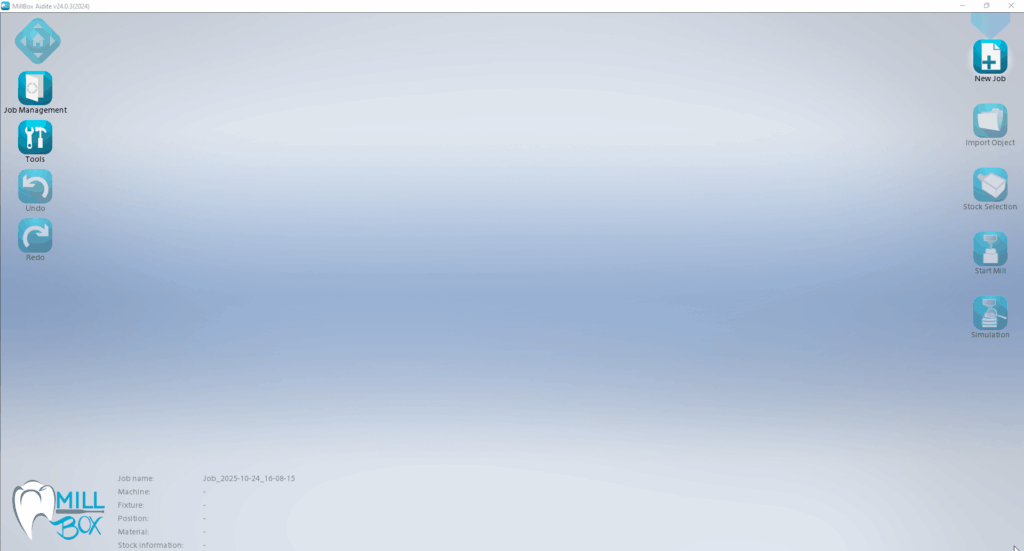


معرفی نرمافزار MillBox v24
MillBox v24 جدیدترین نسخه از نرمافزار تخصصی CAM (Computer-Aided Manufacturing) دندانپزشکی است که توسط شرکت ایتالیایی CIMsystem توسعه یافته است. این نرمافزار با هدف ارائه راهحلی ساده، قدرتمند و هوشمند برای فرزکاری (میلینگ) انواع ترمیمهای دندانی با هر نوع مادهای طراحی شده است و به عنوان یک ابزار ضروری در لابراتوارهای دندانسازی و مراکز فرزکاری در سراسر جهان شناخته میشود.
نسخه 2024 (v24) با قابلیتهای جدید و بهبودهای متعددی عرضه شده است که از جمله مهمترین آنها میتوان به افزایش کارایی پردازنده، Z Nesting، تشخیص خودکار Locator و بهبودهای متعدد در رابط کاربری اشاره کرد.
بر اساس اطلاعات رسمی، کاربرانی که هنوز از نسخههای قدیمیتر مانند MillBox 2022 استفاده میکنند، بهزودی پشتیبانی فنی را از دست خواهند داد و توصیه میشود هرچه سریعتر به نسخه ۲۰۲۴ ارتقا پیدا کنند.
نسخههای MillBox
این نرمافزار در چهار نسخه اصلی برای پاسخگویی به نیازهای مختلف تولید ارائه میشود:
- MillBox Clinic: نسخه مخصوص دندانپزشکان و کلینیکها برای انجام فرزکاریهای ساده و سریع در لابراتوار شخصی. اقتصادی، مؤثر و خودکار با رابط کاربری بسیار ساده که نیاز به دانش قبلی CAM ندارد.
- MillBox Eco: نسخه پایه برای مراکز فرزکاری و لابراتوارهای دندانسازی با گردشکارهای پایدار. بهترین نسبت قیمت به کیفیت.
- MillBox Standard: نسخه استاندارد و جامع با قابلیتهای گستردهتر شامل انتخاب محفظه، حکاکی، تطابق حفره و اسکن بارکد.
- MillBox Expert: نسخه کامل و پیشرفته با کنترل کامل بر استراتژیهای فرزکاری و پشتیبانی از سنگزنی و ماشینکاریهای پیچیده.
قابلیتهای جدید در MillBox v24
نسخه ۲۰۲۴ با ویژگیهای نوآورانهای منتشر شده است که مهمترین آنها عبارتند از:
افزایش کارایی پردازنده (Increase CPU Performance)
- استفاده کامل از توان CPU: کاربران میتوانند در تنظیمات پیکربندی، استفاده از حداکثر توان پردازشی کامپیوتر خود را فعال یا غیرفعال کنند. این ویژگی به کاربران امکان میدهد تا از قدرت کامل CPU خود در هنگام اجرای پروژهها در MillBox استفاده کنند.
گزینههای جدید پین پشتیبانی برای PEEK Pre-Milled Abutments
- مدیریت پینها در مواد PEEK: کاربران اکنون چندین گزینه برای تنظیم گزینههای پیشفرض پینهای پشتیبانی برای قطعاتی که در بلوکهای Pre-Milled Abutment از جنس PEEK قرار میگیرند، دارند. قبل از این بهروزرسانی، مدیریت گزینههای پین پشتیبانی برای این ماده و نوع شیء ممکن نبود.
Z Nesting
- کنترل موقعیت در محور Z: این قابلیت که برای مدیریت بهتر عملیات Nesting در بلوکهای چندلایه طراحی شده است، به کاربران امکان میدهد موقعیت قطعات را در محور Z انتخاب کنند. کاربران میتوانند قطعات را نزدیک به بالا، پایین یا مرکز بلوک قرار دهند. موقعیت انتخابشده شامل یک Offset ایمنی نیز میشود که از قرارگیری قطعه خارج از مرزهای بلوک جلوگیری میکند.
تشخیص خودکار Locator
- سادهسازی فرآیند فرزکاری: گزینه جدید تشخیص دستی Locator اضافه شده است که فرآیند فرزکاری را سادهتر میکند و میتواند همه کارها را بهصورت یکپارچه انجام دهد. این قابلیت نیاز به یک استراتژی دارد که Locatorها را مدیریت کند.
Margin Lines روی Bite
- واردات منحنیهای Bite: اکنون امکان واردات منحنیها روی Bite بهطور مستقیم از فایل اطلاعات ساخت STL وجود دارد. این قابلیت که مدیریت Bite را بهینه میکند، میتواند با گزینه بهینهسازی جهتگیری Bite ترکیب شود تا کار روی ترمیمهای Bite را سادهتر کند. اگر اطلاعات مربوط به Margin Line در فایل اطلاعات ساخت وجود نداشته باشد، میتوان آن را بهصورت دستی رسم کرد.
پیشنمایش پویای STL (New Dynamic STL Preview)
- رابط کاربری بهبودیافته: پیشنمایش STL با چیدمان بهتر و نوار ابزاری برای انجام اقدامات مهم مانند تحلیل ضخامت و برش ترمیم، بهبود یافته است.
چرخش خودکار برای Bite Restoration
- بهینهسازی موقعیت Bite: صرفنظر از موقعیتی که Bite از CAD وارد میشود، MillBox قادر است موقعیت آن را روی پشتیبان بهینهسازی کند تا بلافاصله قابل فرزکاری باشد. این بهینهسازی تنها در صورت فعال بودن گزینههای هوش مصنوعی امکانپذیر است.
سازگاری با دستگاههای فرز
این نرمافزار با طیف گستردهای از دستگاههای فرزکاری سازگار است:
- DGSHAPE (Roland): سری DWX شامل DWX-50، DWX-51D، DWX-4، DWX-42W و سایر مدلها
- DOF
- Up3D
- VHF
- Imes
- ARUM
- CRAFT
- Cradle
- Aidite
- Yena
همچنین امکان یکپارچگی با انواع نرمافزارهای CAD، مواد دندانی و ابزارها فراهم است.
مزایای استفاده از MillBox v24
- ✅ رابط کاربری ساده و کاربرپسند با طراحی گرافیکی نوآورانه که استفاده از نرمافزار را حتی برای افراد مبتدی آسان میکند
- ✅ افزایش کارایی پردازنده با استفاده کامل از توان CPU در زمان اجرای پروژهها
- ✅ Z Nesting برای مدیریت بهتر قطعات در بلوکهای چندلایه
- ✅ تشخیص خودکار Locator برای سادهسازی فرآیند فرزکاری
- ✅ قابلیت واردات منحنیهای Bite مستقیم از فایل STL
- ✅ بهینهسازی خودکار موقعیت Bite با استفاده از هوش مصنوعی
- ✅ پشتیبانی از انواع دستگاههای فرز و نرمافزارهای CAD
- ✅ مناسب برای تولیدات کوچک و بزرگ با ارائه نسخههای مختلف
- ✅ قابلیت سفارشیسازی پیشرفته پارامترهای فرزکاری
Introducing MillBox v24
MillBox v24 is the latest version of the specialized dental CAM (Computer-Aided Manufacturing) software, developed by the Italian company CIMsystem. This software is designed to provide a simple, powerful, and intelligent solution for milling various dental restorations with any type of material and is recognized as an essential tool in dental laboratories and milling centers worldwide.
Version 2024 (v24) has been released with new features and numerous improvements, the most important of which include increased CPU performance, Z Nesting, automatic Locator detection, and various user interface improvements.
According to official information, users still using older versions like MillBox 2022 will soon lose technical support and are strongly advised to upgrade to the 2024 version as soon as possible.
MillBox Editions
This software is available in four main editions to meet different production needs:
- MillBox Clinic: Designed for dentists and clinics for simple and fast milling in personal laboratories. Economical, effective, and automated with a very simple interface that requires no prior CAM knowledge.
- MillBox Eco: Base version for milling centers and dental laboratories with stable workflows. The best price-to-quality ratio.
- MillBox Standard: Standard and comprehensive version with broader capabilities including chamber selection, engraving, cavity matching, and barcode scanning.
- MillBox Expert: Full and advanced version with complete control over milling strategies and support for grinding and complex machining.
New Features in MillBox v24
Version 2024 has been released with innovative features, the most important of which include:
Increase CPU Performance
- Full CPU Utilization: Users can enable or disable the use of maximum processing power in configuration settings. This feature allows users to leverage the full power of their CPU when running projects in MillBox.
New Support Pin Options for PEEK Pre-Milled Abutments
- Pin Management in PEEK Materials: Users now have multiple options for setting default support pin settings for parts placed in PEEK Pre-Milled Abutment blocks. Previously, managing support pin options for this material and object type was not possible.
Z Nesting
- Z-Axis Position Control: Designed for better Nesting management in multi-layer blocks, this feature allows users to select part positions along the Z-axis. Users can place parts near the top, bottom, or center of the block. The selected position includes a safety offset to prevent the part from being placed outside the block boundaries.
Automatic Locator Detection
- Simplified Milling Process: A new manual Locator detection option has been added, simplifying the milling process and handling everything seamlessly. This feature requires a strategy that manages the Locators.
Margin Lines on Bite
- Bite Curve Import: It is now possible to import curves on Bite directly from the STL manufacturing information file. This feature, which optimizes Bite management, can be combined with Bite orientation optimization to simplify work on Bite restorations. If Margin Line information is not present in the manufacturing information file, it can be drawn manually.
New Dynamic STL Preview
- Improved User Interface: The STL preview has been improved with better layout and a toolbar for performing important actions such as thickness analysis and restoration cutting.
Automatic Rotation for Bite Restoration
- Bite Position Optimization: Regardless of the position from which the Bite is imported from CAD, MillBox can optimize its position on the support so that it is immediately ready for milling. This optimization is only possible if the artificial intelligence options are enabled.
Milling Machine Compatibility
This software is compatible with a wide range of milling machines:
- DGSHAPE (Roland): DWX series including DWX-50, DWX-51D, DWX-4, DWX-42W, and other models
- DOF
- Up3D
- VHF
- Imes
- ARUM
- CRAFT
- Cradle
- Aidite
- Yena
Integration with various CAD software, dental materials, and tools is also available.
Benefits of Using MillBox v24
- ✅ Simple and user-friendly interface with innovative graphic design, making the software easy to use even for beginners
- ✅ Increased CPU performance with full processor utilization during project execution
- ✅ Z Nesting for better part management in multi-layer blocks
- ✅ Automatic Locator detection for simplified milling process
- ✅ Direct Bite curve import from STL files
- ✅ Automatic Bite position optimization using artificial intelligence
- ✅ Support for various milling machines and CAD software
- ✅ Suitable for both small and large production with different editions
- ✅ Advanced customization of milling parameters